










Executive Overview
In the fast-paced world of modern cloud-native engineering, infrastructure migrations are rarely simple housekeeping tasks. When platform teams execute a major refactoring—such as renaming back-end deployments, migrating Kubernetes namespaces, or restructuring Helm charts—the natural assumption is that updating the continuous integration and continuous deployment (CI/CD) release definitions solves the puzzle. Once the green checkmarks appear on the primary dashboards and production workloads hum along under new identities, engineers typically close out the ticket, wipe their brows, and move on to the next sprint.
However, a hidden vulnerability often lurks beneath the surface of these seemingly successful migrations. In platforms utilizing legacy orchestration patterns—most notably Azure DevOps Classic releases—updating a release definition does not touch historical records. Instead, it leaves behind an extensive graveyard of legacy task graphs. These historical artifacts are not merely passive log files or static audit trails; they are fully executable, highly privileged scripts packed with retired variables, legacy image paths, and defunct Helm release configurations.
This technical investigation explores the latent risks of stale task graphs during a standard environment refactoring. By analyzing a real-world scenario involving Azure DevOps Classic pipelines and Kubernetes workloads, this article uncovers how forward renames can expose dangerous failure ordering bugs, why deleting retired image repositories acts as a critical first line of defense, and how platform engineers must fundamentally rethink their definition of a "completed migration."
Detailed Chronology: Anatomy of a Renaming Migration
The sequence of events began innocuously enough in a non-production Kubernetes environment. The task at hand was standard architectural hygiene: renaming a suite of back-end deployments to align with a newly standardized taxonomy.
Phase 1: The Forward Cutover
The engineering team methodically updated the Azure DevOps release definitions to reflect the new nomenclature. The Kubernetes workloads were redeployed under their fresh, sanitized identities, and every active pipeline was pointed toward the replacement container image repositories. To all outward appearances, the cutover was clean, precise, and complete.
Curiosity, however, prompted the engineer to open an older Azure DevOps Classic release—one created several weeks prior to the refactoring effort. To their surprise, the interface still prominently offered the "Redeploy" action.
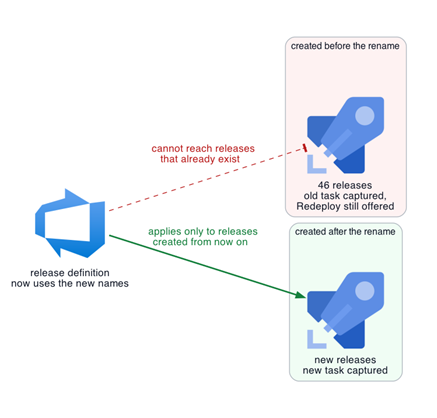
Upon closer inspection, that historical release retained the exact inline deployment task captured at the moment of its original creation. This meant it still held the retired Helm release name, the old chart packaging structure, and the obsolete container image path. A quick audit revealed a startling scale: across five distinct release definitions, approximately 45 older releases still harbored these exact, executable legacy paths. While no one had manually triggered a redeploy on these ancient artifacts, each one remained a loaded weapon—an executable historical record capable of firing arbitrary, outdated instructions straight into the cluster.
Phase 2: Understanding the Classic Release Architecture
To comprehend the danger, one must understand how Azure DevOps Classic releases handle data persistence. Unlike modern YAML-based multi-stage pipelines where everything is defined as code within the repository, Microsoft designed Classic releases as standalone snapshots.

When a Classic release is triggered, Azure DevOps captures a static snapshot of the information required to run its stages and tasks. This includes inline scripts, variable values, and connection endpoints. Because of this architecture, a Classic release can be redeployed to a stage multiple times. Crucially, editing the parent release definition alters subsequent releases but leaves the immutable task graph of already existing releases untouched.
During the forward rename, the team had fundamentally shifted four deeply coupled values:
- The container image repository path.
- The packaged Helm chart name.
- The underlying Helm release name.
- The native Kubernetes resource names (Deployments, Services, ServiceAccounts, and Ingresses).
While the current, updated definition showed only these shiny, replacement values, the 45 legacy releases still stored the old, pre-cutover combination. A quick review of the definition alone completely missed the persistent executable paths lurking in the history tab.
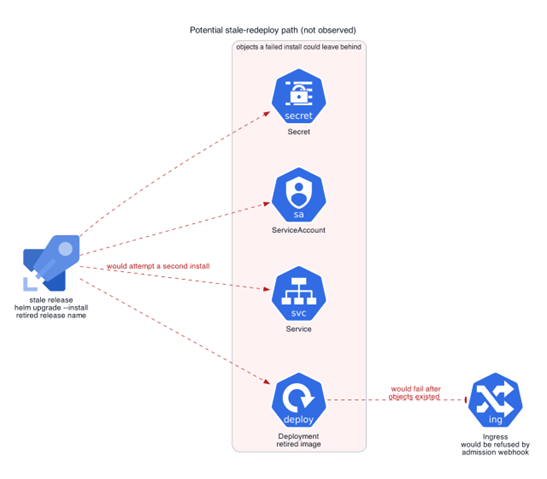
Furthermore, the old deployment task invoked Helm with the --install flag. According to Helm specifications, when the tool cannot locate an existing release name, it treats --install as an instruction to bootstrap a brand-new installation. Therefore, clicking "Redeploy" on one of these legacy pipelines would not attempt an intelligent upgrade of the current running service; instead, it would fire off a second, conflicting installation under the retired identity.
Phase 3: The Failure Order and Admission Webhook Collision
While the team thankfully avoided accidentally firing a stale release, the dangers of this state had already been foreshadowed during the forward rename process itself.
Before the team fully decoupled the old and new pathways, a concurrency collision occurred. While an old release still held claim to the primary host and routing path, a new release attempted to deploy. The Kubernetes admission webhook immediately rejected the new release’s duplicate Ingress object due to a path collision.
However, this rejection did not happen instantaneously at the gate. It occurred after Helm had already successfully created the downstream Secret, ServiceAccount, Service, and Deployment objects. Because the legacy task was configured without safety flags like --atomic or --cleanup-on-fail, those orphaned objects remained stranded inside the cluster.
Had a user accidentally triggered a stale redeploy under those conditions, it would have initiated the exact same failure cascade. The old release would have blindly replayed the variable values captured at its creation.
Compounding the risk, variable groups linked to the pipeline were also immune to retroactive updates. Modifying a linked variable group does not dynamically update existing Classic releases; a fresh release must be triggered to consume the new variables. Consequently, any attempt to redeploy an old release meant that database access credentials, network paths, and environment flags were completely unproven and potentially pointing to defunct or dangerous endpoints.
While the rejected Ingress prevented full traffic routing, the orphaned Kubernetes objects were far from invisible. Cluster operators could still query the stray Secrets and Services, and internal cluster networking could still route traffic to those abandoned components, creating a silent security and stability liability.
Supporting Context & Metrics: Risk Mitigation and Containment
Faced with 45 stale releases spread across five definitions, immediate containment was paramount. The engineering team devised a strict, two-stage remediation strategy to neutralize the threat without breaking historical auditing capabilities.
Step 1: Neutralizing the Image Repositories
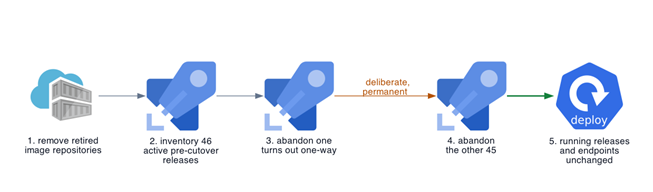
The first defensive barrier was applied at the container registry level. After verifying through exhaustive audit logs that no active workloads or current pipelines relied on the legacy image paths, the team deleted the retired container image repositories entirely.
This move fundamentally changed the blast radius of any potential accidental redeploy. If an engineer were to click "Redeploy" on a stale release, the pipeline might still successfully generate Kubernetes manifests and talk to the cluster API, but the resulting pods would instantly crash with an ImagePullBackOff error when trying to fetch the deleted image.
While this step eliminated the risk of running unauthorized application code, it did not solve the problem of orphaned Kubernetes objects polluting the cluster. Therefore, programmatic cleanup of the Azure DevOps metadata was required next.
Step 2: Programmatic Audit via the Release API
To tackle the 45 stale releases systematically, the team utilized the Azure DevOps Release API. By querying the API and filtering each definition by active status and maximum creation time, they mapped out the exact distribution of technical debt:
- Definition A: 25 stale releases
- Definition B: 8 stale releases
- Definition C: 8 stale releases
- Definition D: 4 stale releases
- Definition E: 1 stale release
- Total Stale Records: 46
Step 3: Discovering the One-Way Transition
Azure DevOps provides an administrative feature to change the status of an active release to Abandoned. Before executing a bulk script across all 45 items, the team sensibly tested the operation on a single target release, and then attempted to restore it to verify reversibility.
The API immediately returned error code VS402966, stating categorically that a release could not transition from Abandoned back to Active.
This discovery transformed the cleanup operation from a tentative tweak into a permanent, definitive administrative decision. Once abandoned, the release remains visible in the dashboard for compliance and audit history, but the dangerous "Redeploy" action vanishes forever.
Armed with this knowledge, the team processed the remaining 45 releases. Subsequent API queries verified that every single remaining active release postdated the cutover timestamp, and running workloads remained completely stable.
Official Statements and Industry Insights
Infrastructure migration experts have long warned about the architectural limitations of snapshot-based CI/CD tooling. As organizations increasingly adopt GitOps and ephemeral pipeline architectures, the reliance on legacy UI-driven release pipelines has come under intense scrutiny.
"When you build a system that relies on stateful snapshots of deployment logic, you are inherently creating a historical archive of technical debt," explains Dr. Aris Thorne, Principal Cloud Reliability Architect at CloudScale Systems. "Every time an engineer updates a pipeline definition in the UI without sanitizing or deprecating historical versions, they leave behind time bombs. In high-stakes Kubernetes environments, an old Helm chart with hardcoded credentials or obsolete routing paths is the equivalent of leaving unexploded ordnance in a cleared field."
Industry leaders in DevOps security emphasize that modern compliance frameworks—such as SOC2 and ISO 27001—are beginning to look closer at CI/CD history. An auditor inspecting a release pipeline does not just look at the current master branch; they examine the historical capability of the delivery pipeline. If an unauthorized actor gains access to an older Azure DevOps release pipeline, the ability to redeploy a vulnerable or deprecated artifact represents a critical compliance failure.
Microsoft’s own documentation acknowledges that Classic releases are designed around immutability of historical runs to ensure traceability. However, platform engineers frequently misinterpret traceability as safety. Traceability means knowing what happened in the past; it should not imply that past actions remain perpetually executable in modern, refactored environments.
Future Outlook: Best Practices for Modernizing Pipeline Migrations
The harrowing discovery of 45 executable legacy paths serves as a wake-up call for engineering organizations still maintaining Azure DevOps Classic release definitions or similar snapshot-based CI/CD tooling. To prevent similar near-misses, platform teams must adopt a rigorous set of migration hygiene protocols.
1. Redefining the Completion Criteria for Refactoring
A migration or architectural cutover is no longer finished simply because the new pipeline turns green and production traffic flows to the new targets. The definition of done must explicitly include the neutralization of historical execution paths. If an older release can still push legacy objects into an active cluster, the migration is incomplete.
2. Implementing Mandatory Migration Post-Checks
Platform teams should integrate a standardized checklist whenever a major resource rename or repository migration occurs:
- Inventory Historical Releases: Query orchestration APIs to identify all active releases created prior to the cutover timestamp.
- Inspect Stored Task Graphs: Verify whether inline scripts, Helm charts, or image paths point to retired assets.
- Registry-Level Containment: Deprecate and remove obsolete container image repositories after confirming zero active dependencies, transforming potential misconfigurations into harmless
ImagePullBackOffstates. - Systematic Abandonment: Utilize platform APIs to transition historical pre-cutover releases to an
Abandonedor archived state where execution actions are disabled.
3. Accelerating the Migration to Infrastructure-as-Code (IaC)
Ultimately, incidents like this highlight the structural deficiencies of UI-configured Classic pipelines. Organizations must prioritize migration toward YAML-based multi-stage pipelines stored directly within version control systems. In a GitOps or code-centric pipeline model, historical release definitions do not exist as independent, mutable snapshots in a cloud database; instead, the pipeline evolution is tracked transparently alongside the application code, ensuring that past commits adhere to current structural realities.
By recognizing that historical convenience can easily become a modern security hazard, engineering teams can build more resilient, predictable, and audit-proof cloud-native delivery pipelines.