







Executive Overview
For millions of software developers worldwide, the honeymoon phase with artificial intelligence coding assistants has evolved into a sober, pragmatic operational reality. The initial wave of excitement—driven by generative models capable of spinning up boilerplate code, parsing regex, and drafting unit tests in seconds—has given way to a familiar workflow bottleneck.
An AI coding agent generates clean-looking code, the automated test suite flashes green, and a human reviewer subsequently catches a subtle edge case that the model blithely overlooked. The underlying issue is not malice or incompetence; the model simply suffers from a fundamental limitation: it does not know what it does not know. Isolated within its own reasoning loop, a single AI agent lacks a critical peer to challenge its assumptions, question its architecture, or push back against its confidence.
Microsoft’s release of Visual Studio Code version 1.135 marks a deliberate, structurally significant swing at this problem. Rather than focusing merely on generation speed or token throughput, the latest iteration of the world’s most popular Integrated Development Environment (IDE) introduces architectural frameworks designed to instill order, persistence, and critical review into agentic workflows.
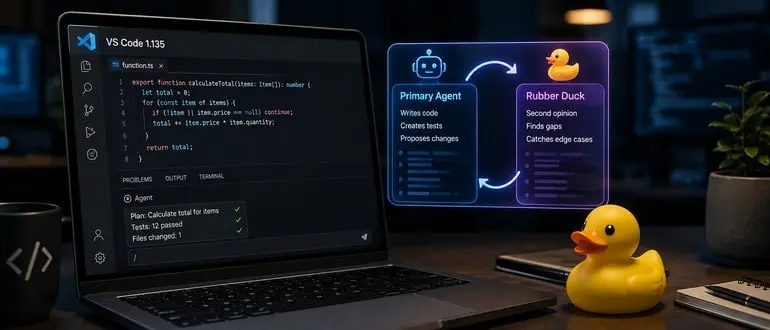
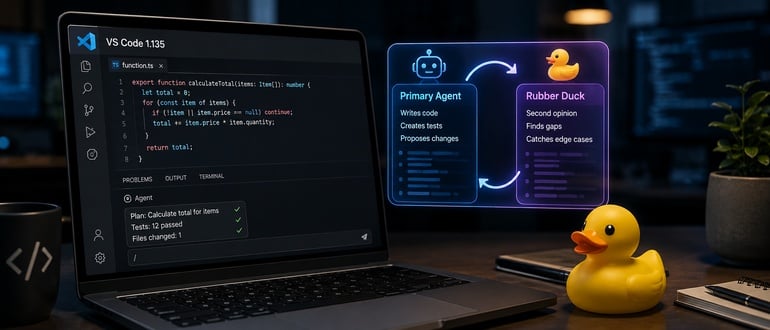
At the center of this release is an experimental feature playfully dubbed Rubber Duck—a digital homage to the classic software engineering trope of explaining complex code to an inanimate object to debug logic errors. However, instead of talking to a plastic bath toy, VS Code pits a second, complementary AI model against the primary agent’s plans.
Alongside Rubber Duck, VS Code 1.135 delivers the Agent Host Protocol (AHP), enhanced cross-application session continuity, a thoroughly redesigned Agents window, and granular token-consumption tracking. Together, these updates signal a profound transformation: the IDE is no longer just a text editor with bolted-on chat windows. It is rapidly becoming an agentic work surface—an orchestrator designed to manage, review, and persist autonomous software engineering workflows at scale.
Detailed Chronology: The Evolution of VS Code’s AI Integration
To understand the weight of version 1.135, one must trace the evolutionary arc of Visual Studio Code over the past several years. What began as a lightweight, extensible source-code editor has systematically absorbed the mechanics of machine learning integration.
The Initial Acceleration Wave
When GitHub Copilot first emerged from private preview, it operated primarily as an inline autocompletion engine. It was reactive, predicting the next few tokens or lines based on immediate context. Developers adapted quickly, treating the tool as an advanced, context-aware tab-completion utility.
Soon, the paradigm shifted from inline completions to chat interfaces sidebars. Developers could highlight blocks of code, open a dedicated chat panel, and prompt an LLM to refactor, explain, or translate languages. While powerful, these chats operated in silos. If a developer closed the window, context vanished. If a complex multi-file refactoring task went off the rails, debugging required meticulous prompt engineering from scratch.
The Agentic Transition
As models grew larger, more capable, and equipped with function-calling capabilities, AI tools graduated from assistants to agents. These agents could read directories, execute terminal commands, run tests, and autonomously stitch together multi-step pull requests.
Yet, this autonomy introduced a new class of headaches. Single-model agents proved notoriously myopic. Tasked with building a feature, an agent would design an architecture optimized for the immediate prompt while remaining blissfully unaware of broader system constraints, performance bottlenecks, or security vulnerabilities lurking in adjacent modules.
Recognizing that throwing more generation power at verification problems was a dead end, Microsoft engineers began laying the groundwork for a multi-model, highly persistent architectural ecosystem within VS Code. Version 1.135 represents the culmination of this foundational shift, standardizing how agents operate, communicate, and interface with human developers.
Core Innovations in Version 1.135
The feature set introduced in VS Code 1.135 is expansive, addressing everything from developer ergonomics and session fatigue to enterprise cost tracking and logical verification.
1. Rubber Duck: The Multi-Model Critique Loop
The headline addition of the release is the /rubber-duck command, operating natively inside Copilot agent host sessions. When invoked, a secondary, complementary AI model is summoned to review the primary agent’s execution plans, drafted code, and test coverage.
Rather than blindly accepting the primary model’s output, the secondary model is explicitly prompted to search for logical gaps, unhandled edge cases, security flaws, and missed architectural constraints.
- How it works: When a primary agent formulates a plan to implement a feature or patch a bug, the user can trigger
/rubber-duck. The secondary model evaluates the proposal from a different structural perspective—often leveraging a different model architecture or training bias—and offers constructive pushback. - The Philosophy: Software engineering has relied on code reviews and pair programming for decades precisely because two human brains working from slightly different mental models catch mistakes that a lone programmer misses. Rubber Duck applies this exact epistemological logic to agentic AI, mitigating the "blind spot" phenomenon inherent in single-model workflows.
2. The Agent Host Protocol (AHP) and Process Isolation
Under the hood, VS Code 1.135 introduces a foundational infrastructural shift: the Agent Host Protocol (AHP).
- Dedicated Processes: Agent harnesses now run in dedicated, isolated processes rather than being tightly bound to the renderer thread or immediate editor state.
- Multi-Window Connectivity: AHP allows developers to connect to the exact same active agent session from multiple VS Code windows simultaneously. For developers who split workflows across a laptop and a multi-monitor desktop setup, this ensures unbroken continuity. You can kick off a long-running refactoring agent on your workstation, walk away, and monitor or redirect its progress from a laptop without missing a beat.
3. Cross-Application Session Continuity
Context switching is the mortal enemy of developer productivity. Previously, if an engineer started an agent session in an external application—such as a specialized web-based Copilot interface or a Claude-powered coding environment—that context stayed trapped in that application.
VS Code 1.135 bridges this gap via an updated Sessions list, which surfaces recently updated agent sessions originating outside of VS Code. Developers can seamlessly pick up an agent’s work right where it was left off in another tool. For enterprise environments with strict compliance or compartmentalized toolchains, this behavior is fully configurable via the chat.agentSessions.showExternal setting, granting platform administrators granular control over cross-application visibility.
4. Interface Redesign: The Streamlined Agents Window
Microsoft recognized that as AI agents take on more responsibilities, IDE real estate becomes intensely competitive. Version 1.135 completely overhauls the Agents window:
- Single-Pane Default Layout: Replaces cluttered multi-panel views with a streamlined, single-pane layout.
- Simplified Controls: Features an intelligent overflow menu designed to keep the workspace clean and focused.
- Interactive Pills: Session details—such as pending code changes, active pull requests, associated issues, and generated artifacts—are now displayed as interactive "pills" directly above the chat input box, banishing them from obscure sidebars.
- Responsive Diffs: Diff visualization has been rewritten for smoother, more responsive side-by-side and inline comparisons.
5. Granular Token Consumption Tracking
For engineering leadership and finance teams tracking AI investments, runaway token consumption has long been a frustrating black box. Running multiple models concurrently through Copilot often resulted in vague, aggregated billing summaries.
VS Code 1.135 introduces transparent, per-model usage metrics. By simply hovering over the footer of any chat response, developers and platform engineers can view a detailed breakdown of:
- Input tokens consumed
- Cached input tokens utilized
- Output tokens generated
This visibility enables engineering managers to audit token efficiency across different workflows, optimize prompt structures, and accurately project software development life cycle (SDLC) AI budgets.
Supporting Context & Metrics: The Reality of AI-Assisted Coding
To contextualize the technical achievements of VS Code 1.135, industry analysts point to broader shifts in software engineering productivity metrics.
While early enterprise surveys touted staggering productivity boosts—often claiming 30% to 55% faster code generation times—subsequent longitudinal studies conducted by software engineering researchers have revealed a nuanced reality. While lines of code are written faster, the volume of code moving through pull requests has surged, placing an unprecedented burden on human code reviewers.
Furthermore, studies examining code quality in AI-heavy repositories note a subtle increase in subtle, non-obvious bugs—particularly in asynchronous error handling, race conditions, and boundary-value logic. Because LLMs are trained to predict statistically probable token sequences rather than mathematically verify runtime execution, they naturally excel at generating code that looks right.
By introducing automated critique mechanisms like Rubber Duck, Microsoft is attempting to address this "illusion of correctness." By forcing a secondary model to interrogate the primary model’s output before human eyes ever touch it, the IDE acts as a preliminary quality filter, absorbing some of the review burden that would otherwise fall squarely on human engineers.
Expert Perspectives
Industry leaders have closely monitored Microsoft’s architectural pivot toward agentic IDEs. Mitch Ashley, Vice President and practice lead for software lifecycle engineering and AI-native software engineering at The Futurum Group, offered a penetrating analysis of the release:
"This is a continuation of the IDE paradigm on its path to an agentic work surface. Once agent sessions run in their own process and persist across windows and applications, the editor becomes the surface on which agent work is directed and reviewed. Rubber Duck answers verification pressure with more generation, and that only goes so far. Watch whether these session protocols stay open enough for teams to run agents from more than one vendor."
— Mitch Ashley, The Futurum Group
Ashley’s commentary strikes at the heart of both the promise and the lingering caveat of the release. On one hand, transforming the IDE into a persistent, process-isolated management surface for autonomous agents represents a major leap forward in developer ergonomics. On the other hand, he issues a vital cautionary note: having one AI model review another AI model’s work is still fundamentally an act of generation, not independent mathematical verification. Treating a Rubber Duck approval as an infallible stamp of correctness would be a dangerous strategic error for development teams.
Moreover, Ashley’s query regarding vendor openness highlights a critical battleground for the future of developer tooling. As the Agent Host Protocol matures, the software community will be watching closely to see whether AHP becomes a genuinely open, multi-vendor standard enabling seamless side-by-side integration of diverse AI models (such as OpenAI, Anthropic, Google, and open-weight models), or if it solidifies into a proprietary Microsoft-centric layer with superficial third-party hooks.
Future Outlook: Where Agentic Coding Is Headed
The release of Visual Studio Code 1.135 offers a clear window into the near future of software engineering. The initial frontier of AI coding assistants was defined by raw speed—helping developers type less and generate more code in shorter timeframes.
The next frontier, inaugurated by releases like this one, is about structural governance and durability. As engineering organizations transition from treating AI as an autocomplete toy to deploying autonomous agents that manage multi-file refactoring, test generation, and bug remediation, the surrounding infrastructure must mature accordingly.
Key trends to watch in the coming quarters include:
- Deeper Protocol Standardization: Expect broader industry discussions around open agent protocols. Just as the Language Server Protocol (LSP) revolutionized code intelligence across diverse IDEs and languages, an open Agent Host Protocol could standardize how agents communicate with development environments.
- Deterministic Verification Layers: While AI-based peer review (like Rubber Duck) provides valuable heuristic critique, the holy grail remains integrating formal methods, static analysis tools, and deterministic test runners directly into the agent feedback loop.
- Enterprise Governance and Cost Controls: As token transparency features become standard across IDEs, procurement and engineering operations teams will demand even tighter integration with enterprise identity providers, policy guardrails, and usage quotas.
Ultimately, Microsoft is not positioning these tools as a replacement for human intellect. Rubber Duck is explicitly labeled as experimental, and no responsible engineering team will substitute machine self-critique for rigorous human code review, robust testing pipelines, and architectural oversight.
However, by building structured environments around AI speed—providing persistent sessions, process isolation, multi-model cross-examination, and crystal-clear token visibility—VS Code 1.135 establishes a mature blueprint for how human developers and autonomous agents will collaborate in the years to come.
Visual Studio Code 1.135 is available for download now through the standard update channel.
Frequently Asked Questions
What is Rubber Duck in VS Code 1.135?
Rubber Duck is an experimental feature introduced in VS Code 1.135 that allows a primary AI coding agent to receive a second opinion from a complementary secondary AI model. Triggered via the /rubber-duck command within Copilot agent host sessions, it reviews the primary agent’s execution plans, code, and test coverage specifically to surface overlooked edge cases, logical gaps, and potential bugs.
What does the Agent Host Protocol (AHP) do?
The Agent Host Protocol provides a structured, process-isolated framework for running AI agent harnesses. It enables agent sessions to run in dedicated processes and allows developers to connect to the exact same active agent session from multiple VS Code windows simultaneously, ensuring session continuity across different devices and workflows.
Can Rubber Duck replace human code review?
No. While a secondary AI model evaluating a primary model’s work can catch subtle edge cases and logic gaps that a single model misses, it is still fundamentally a generative AI analysis rather than independent, deterministic verification. Human code review, comprehensive testing, and rigorous security audits remain indispensable.