







Executive Overview
In the professional video production landscape, precision is not a luxury—it is an absolute requirement. As we progress through 2026, the technology powering cameras, non-linear editors (NLEs), and broadcast pipelines has reached unprecedented levels of sophistication. Yet, despite these advancements, a critical and preventable issue continues to plague the industry: Framerate Malpractice.
Coined by veteran broadcast journalist and technology analyst Allan Tépper, "Framerate Malpractice" refers to the deceptive practice of labeling non-integer frame rates as integer rates within camera menus and software interfaces.
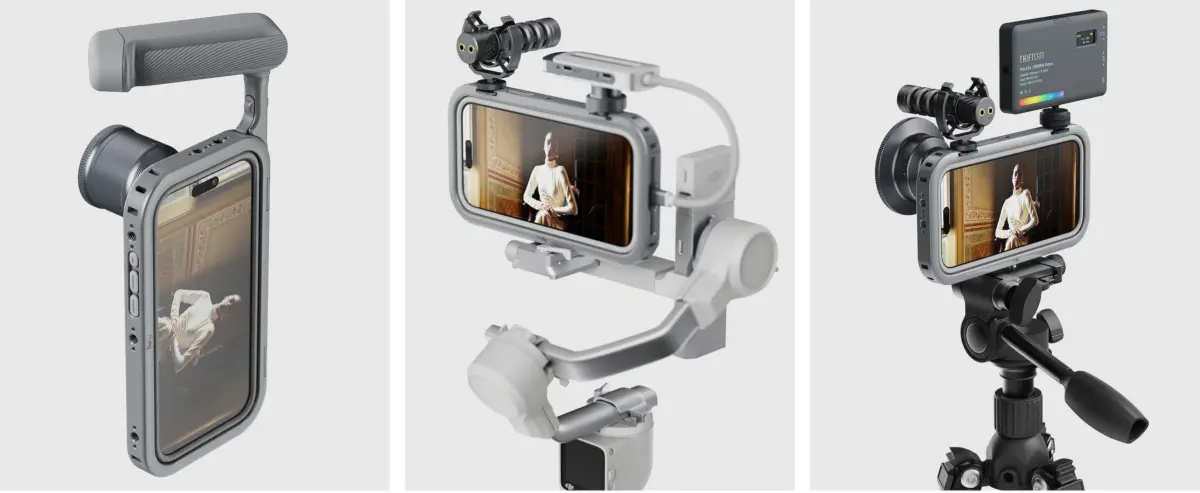
While industry leaders such as Blackmagic Design, Canon, OBSBOT, Panasonic Lumix, and Sigma have embraced transparency by displaying exact frame rates to at least two decimal places, GoPro remains a notable outlier. The release of the GoPro Mission 1 Pro ILS (MSRP $699.99, body-only) has reignited this industry-wide debate. Despite its premium positioning and specialized targeted use cases, the Mission 1 Pro ILS continues to display NTSC-derived non-integer frame rates as rounded integer values.
This investigative report explores the technical realities of this UI deception, the operational chaos it inflicts on multi-camera workflows, the paradox of the "GoPro Labs" software workarounds, and the clear path forward for GoPro to rectify this issue through a standard firmware update.
Detailed Chronology: The Legacy of Framerate Discrepancies
To understand why GoPro’s menu design is so problematic, one must look back to the origins of color television broadcasting in North America.
[Pre-1953] Monochrome NTSC standardizes on exact 30.00 fps / 60.00 Hz
       │
[1953] Color subcarrier introduced -> Framerates slowed down by 0.1% to avoid interference
       │
       └───> 30 fps becomes 29.97 fps (29.97002997...)
       └───> 24 fps becomes 23.976 fps (23.976023976...)
       └───> 60 fps becomes 59.94 fps (59.94005994...)
       │
[Modern Era] Digital distribution introduces TRUE 24.00, 30.00, and 60.00 fps alongside NTSC rates
       │
[2026] GoPro Mission 1 Pro ILS releases, labeling 29.97 as "30" and 23.976 as "24" in stock menus
The 1953 Split
Before 1953, the United States NTSC monochrome television standard operated at an exact integer rate of 30 frames per second (fps). When color television was introduced, engineers realized that the color subcarrier signal interfered with the audio carrier signal. To resolve this without rendering millions of black-and-white television sets obsolete, the industry agreed to slow the frame rate down by exactly 0.1%.
Consequently, 30 fps became 29.97 fps (specifically, $30 / 1.001$), 24 fps became 23.976 fps ($24 / 1.001$), and 60 fps became 59.94 fps ($60 / 1.001$).
For decades, these non-integer rates were the undisputed standard for television broadcasting in NTSC regions (such as North America, Japan, and parts of South America). Meanwhile, PAL and SECAM territories (Europe, Asia, and most of Africa) maintained clean, integer rates of 25 fps and 50 fps, which never suffered from non-integer shifts because their electrical grids operated at 50 Hz rather than 60 Hz.
The Modern Dilemma: The Coexistence of Integer and Non-Integer Standards
In the digital age, the paradigm shifted again. The rise of computer monitors, gaming consoles, mobile devices, and digital cinema (DCI) reintroduced true integer rates to the mainstream:
- True 24.00 fps became the absolute standard for DCI digital theatrical projection.
- True 30.00 fps and 60.00 fps became standard for computer graphics, video game capture, and web-native streaming platforms.
- Simultaneously, 23.976 fps, 29.97 fps, and 59.94 fps remained mandatory for traditional over-the-air television broadcasting and broadcast-linked streaming networks.
Because both integer and non-integer rates are actively used today, mislabeling one as the other is no longer a harmless simplification. It is a technical misrepresentation that introduces severe friction into professional post-production pipelines.
Technical Deep Dive: The Cost of Menu Deception
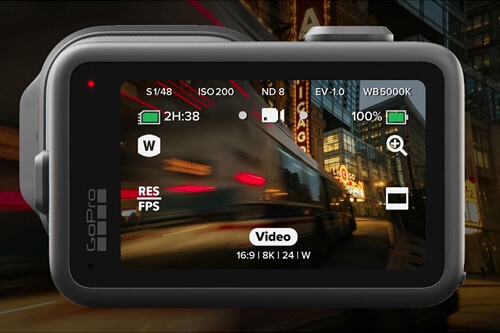
When a camera like the GoPro Mission 1 Pro ILS displays "24 fps" in its stock menu while actually recording at 23.976 fps, it commits a user-interface error that can jeopardize entire productions.
Why "Rounding Up" is Deceptive
In the menu of the Mission 1 Pro ILS, users are presented with options like 24, 30, and 60. In its out-of-the-box configuration, the camera does not record at these true integer rates. Instead, it records at 23.976, 29.97, and 59.94 fps, respectively.
┌─────────────────────────────────────────────────────────────┐
│                 GOPRO MISSION 1 PRO ILS                     │
├──────────────────────────────┬──────────────────────────────┤
│      Menu Display Value      │     Actual Recorded Rate     │
├──────────────────────────────┼──────────────────────────────┤
│            "24"              │           23.976             │
│            "30"              │           29.97              │
│            "60"              │           59.94              │
└──────────────────────────────┴──────────────────────────────┘
This rounding-up practice was tolerated in the early days of digital action cameras when they were viewed as consumer-grade novelties. However, the Mission 1 Pro ILS is marketed as a professional tool, often integrated into complex multi-camera setups alongside cinema packages from RED, ARRI, Sony, and Canon.
The Impact on Multi-Camera Workflows
When a production mixes cameras, matching frame rates is critical. Consider a multi-camera shoot featuring:
- A primary cinema camera (e.g., Blackmagic URSA Mini Pro) set to record at true 24.000 fps for a theatrical release.
- A secondary B-camera (e.g., Canon EOS C300 Mark III) set to true 24.000 fps.
- A GoPro Mission 1 Pro ILS used as a crash-cam, with its menu set to "24".
Because the GoPro is actually recording at 23.976 fps despite claiming "24," the post-production editor faces immediate synchronization issues:
- Audio Drift: Over a long take, the audio recorded on the primary system will drift out of sync with the GoPro footage. A 0.1% speed discrepancy results in approximately 3.6 seconds of drift per hour of continuous recording.
- Frame Dropping/Duplication: To keep the clips aligned on a true 24.000 fps timeline, the NLE must drop or duplicate frames of the GoPro footage, leading to visible stuttering, motion artifacts, and rendering delays.
- Timecode Mismatches: If using timecode generators to sync the cameras, the non-integer frame rate of the GoPro will cause the timecode to drift, making automated multi-cam syncing impossible.
These issues cost production companies time and money, requiring manual intervention, speed-ramping, and extensive QC troubleshooting in the edit suite.
The GoPro Labs Paradox: Proof of Capability
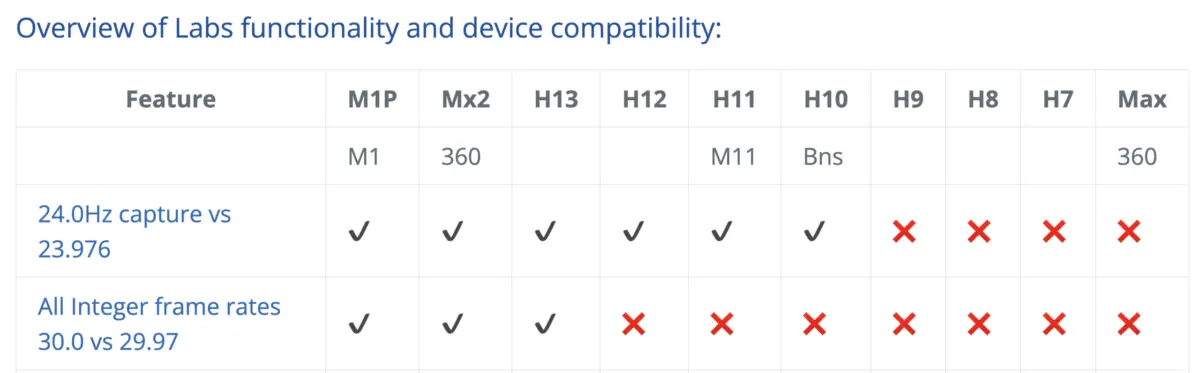
The most frustrating aspect of GoPro’s continued framerate malpractice is that the camera hardware is fully capable of shooting true integer rates. The limitation is entirely artificial, enforced by the default consumer-facing user interface.
This is proven by GoPro Labs, an official but experimental software branch that allows power users to unlock advanced features via custom firmware and QR codes.
                       [GoPro Labs Firmware Installed]
                                      │
                 ┌────────────────────┴────────────────────┐
                 ▼                                         ▼
     [Scan QR Code to Force]                   [Scan QR Code to Force]
      True Integer 24.00 fps                    True Integer 30.00 fps
                 │                                         │
                 ▼                                         ▼
      Record exact DCI Cinema                  Record exact Web/Gaming
By flashing the Mission 1 Pro ILS with GoPro Labs firmware, users can input specific commands to bypass the stock menu limitations, forcing the camera to record in true integer modes (such as exact 24.000 fps or exact 30.000 fps).
While the existence of GoPro Labs is a testament to the versatility of GoPro’s engineering team, it highlights a major usability paradox:
- The Capability Exists: The image processor and sensor can natively handle both integer and non-integer rates.
- The Interface Fails: The stock firmware forces professionals to rely on an external "hack" (generating and scanning QR codes) to achieve standard industry frame rates.
- No UI Confirmation: Even when a user successfully overrides the camera’s behavior using GoPro Labs, the stock menu still fails to accurately display the active rate, leaving the operator without on-screen confirmation of their settings.
Official Analysis and Comparative Standards
To illustrate how far behind GoPro has fallen in terms of user-interface transparency, we can compare its menu behavior with other prominent camera manufacturers in 2026.
| Manufacturer | Menu Display (NTSC-derived) | Menu Display (DCI/Integer) | User Confusion Risk | Professional Grade |
|---|---|---|---|---|
| Blackmagic Design | 23.98 / 29.97 / 59.94 | 24.00 / 30.00 / 60.00 | Extremely Low | Yes |
| Canon | 23.976 / 29.97 / 59.94 | 24.00 / 30.00 / 60.00 | Extremely Low | Yes |
| Panasonic Lumix | 23.98p / 29.97p | 24.00p / 30.00p | Low | Yes |
| OBSBOT | 23.98 / 29.97 / 59.94 | 24.00 / 30.00 / 60.00 | Low | Yes |
| Sigma | 23.98 / 29.97 / 59.94 | 24.00 / 30.00 / 60.00 | Low | Yes |
| GoPro (Mission 1 Pro) | "24" / "30" / "60" | Hidden behind Labs | High | No (UI Only) |
Credit Where Credit is Due: PAL Region Support
It is worth noting that GoPro does handle PAL-region integer rates correctly. When the camera’s regional setting is switched to PAL, the menus correctly display 25 and 50 fps. Because these rates do not have historical non-integer variants, they are inherently accurate.
GoPro deserves credit for including these formats and labeling them properly. However, this regional success only highlights the inconsistency of their NTSC-region menu design.
The Path Forward: A Call to Action for GoPro
The purpose of highlighting these UI flaws is not to diminish GoPro’s achievements. The Mission 1 Pro ILS is a highly capable imaging tool with impressive stabilization, color science, and durability. However, professional hardware demands a professional user interface.
To resolve this issue and eliminate framerate malpractice once and for all, GoPro should implement the following changes in a future firmware update:
┌────────────────────────────────────────────────────────────────────────┐
│               RECOMMENDED GOPRO FIRMWARE UPDATE PATH                   │
├────────────────────────────────────────────────────────────────────────┤
│                                                                        │
│  [Step 1: Decimal Precision]                                           │
│   Update default menu labels to show true decimal values:              │
│   "24" ──> "23.98"  |  "30" ──> "29.97"  |  "60" ──> "59.94"           │
│                                                                        │
│  [Step 2: Native Integer Toggle]                                       │
│   Add a menu option to toggle between Broadcast (NTSC) and             │
│   Digital/Cinema (Integer) rates without requiring GoPro Labs QR codes.│
│                                                                        │
│  [Step 3: Region-Independent Access]                                   │
│   Allow users to select 25p and 50p without forcing a global system     │
│   region change, facilitating global production standards.             │
└────────────────────────────────────────────────────────────────────────┘
1. Implement Explicit Decimal Labels in the Stock Menu
GoPro should update its default menu labels to show accurate decimal values. Instead of a misleading "24," the menu should display 23.98 (or the precise 23.976). Instead of "30" and "60," it should display 29.97 and 59.94. This simple change would align GoPro with the menu design standards of its industry peers.
2. Introduce a Native Integer/Non-Integer Toggle
Rather than hiding true integer rates behind the experimental GoPro Labs firmware, GoPro should integrate these options directly into the standard menu. A simple toggle in the settings menu could let users choose between:
- Broadcast Rates (NTSC): 23.976 fps, 29.97 fps, 59.94 fps.
- Cinema/Digital Rates (Integer): 24.000 fps, 30.000 fps, 60.000 fps.
3. Decouple PAL/NTSC Rates from Regional Settings
Currently, users must change the camera’s global region settings to switch between 25/50 fps (PAL) and NTSC-derived rates. GoPro should allow users to access all supported frame rates from a unified menu, regardless of their geographical location. Modern multi-camera shoots frequently require mixing PAL and NTSC standards on the same set, and the camera’s software should accommodate this flexibility.
Future Outlook: Why Accuracy Matters More Than Ever
As we look toward the future of digital media distribution, the line between traditional television broadcasting, cinema, and online streaming continues to blur. High-end streaming services now enforce strict technical delivery specifications, often requiring master files to be delivered in precise, native frame rates with zero tolerance for sync issues or dropped frames.
At the same time, the rise of virtual production, mixed reality, and real-time game engines (such as Unreal Engine) has made true integer frame rates (24.00, 30.00, 60.00, 120.00) more common in everyday production.
In this evolving landscape, camera manufacturers cannot afford to treat frame rates as approximate values. A $700 specialized camera like the GoPro Mission 1 Pro ILS deserves an interface that reflects its underlying hardware capabilities. By correcting this menu oversight, GoPro can better support the camera operators, editors, and technical directors who rely on its products every day.