







Executive Overview
At the 2026 International Broadcasting Convention (IBC) in Amsterdam, the post-production landscape reached a critical inflection point. Adobe Systems Incorporated unveiled a suite of deeply integrated generative artificial intelligence (AI) tools and assistant workflows for Adobe Premiere Pro and After Effects. Far from the superficial automation of years past, these updates signify a fundamental paradigm shift: moving AI from an external novelty into the core timeline-based environment where professional editors and motion designers spend their working lives.
The announcements, detailed by Deepa Subramaniam (Vice President of Product Marketing at Adobe), highlight a concerted effort to eliminate the friction points of modern video editing. By embedding generative media tools and intelligent assistants directly into the active workspaces of Premiere Pro and After Effects, Adobe aims to transform hours of tedious, manual tasks into seconds-long conversational prompts.
This deep dive examines the technical mechanics of these new tools, analyzes their performance metrics within professional workflows, and contextualizes Adobe’s strategic positioning against an increasingly aggressive field of competitors in the professional creative software space.
Detailed Chronology & Technical Deep Dive
The core of Adobe’s IBC 2026 presentation rests on two pillars: the introduction of the After Effects AI Assistant (Beta) and the evolution of Premiere Pro’s Generative Media Toolset. Together, these updates target the most labor-intensive aspects of post-production—project organization, expression troubleshooting, and visual continuity.
The After Effects AI Assistant (Beta): Conversational Motion Design
For decades, After Effects has been both celebrated for its power and critiqued for its steep learning curve, particularly regarding its expression engine and complex composition hierarchies. The After Effects AI Assistant (Beta) addresses these challenges by acting as an on-demand technical director.
[Traditional After Effects Workflow]          [AI-Assisted Workflow (Beta)]
  ├── Manual Asset Indexing (Hours)             └── Natural Language Indexing (Minutes)
  ├── Syntax Debugging (JavaScript)            └── Automated Expression Repair
  └── Active Comp Limitation                    └── Global Project-Wide Operations
The AI Assistant introduces several key capabilities:
- Automated Project Reorganization: Large-scale commercial and feature projects often suffer from cluttered asset pools. The AI Assistant can analyze, categorize, and reorganize entire project panels—renaming layers, grouping pre-compositions, and structuring folders—based on simple natural language commands.
- Expression Repair and Generation: After Effects expressions are built on a JavaScript framework. When expressions break due to layer renaming or syntax errors, identifying the point of failure can halt production. The AI Assistant can scan an entire project, locate broken expressions, and repair them automatically. Furthermore, users can generate complex expression rigs—such as linking camera movement to audio amplitude—by describing the desired behavior in plain English.
- Global Project Scope: Unlike traditional scripts that only operate on the active composition, the AI Assistant understands the entire project file. It can execute global changes, such as swapping out specific assets across dozens of nested compositions simultaneously.
Industry educators, such as the motion design channel Flomotion, have quickly adopted the beta, demonstrating how the assistant democratizes complex scripting for artists who may not have a background in computer science.
Premiere Pro: Generative Media and Unified Audio Workflows
In Premiere Pro, the spotlight at IBC 2026 is on the Generative Media Tool and the refinement of the software’s Color Mode and Audio Workflows.
+-----------------------------------------------------------------------+
|                       PREMIERE PRO TIMELINE                           |
|                                                                       |
|  [Clip A] -------> [Generative Extend (AI)] -------> [Clip B]         |
|  (Existing Footage)   (Frames created on-timeline)    (Existing)      |
|                                                                       |
|  [Audio Tagging] -> Dialogue, SFX, and Music categorized by AI        |
+-----------------------------------------------------------------------+- Generative Extend: Powered by Adobe’s Firefly Video Model, this tool allows editors to click and drag the edge of a video or audio clip beyond its original media limits. The AI generates new, contextually accurate frames to fill the gap, solving the perennial problem of clips that are "one second too short" for a clean transition.
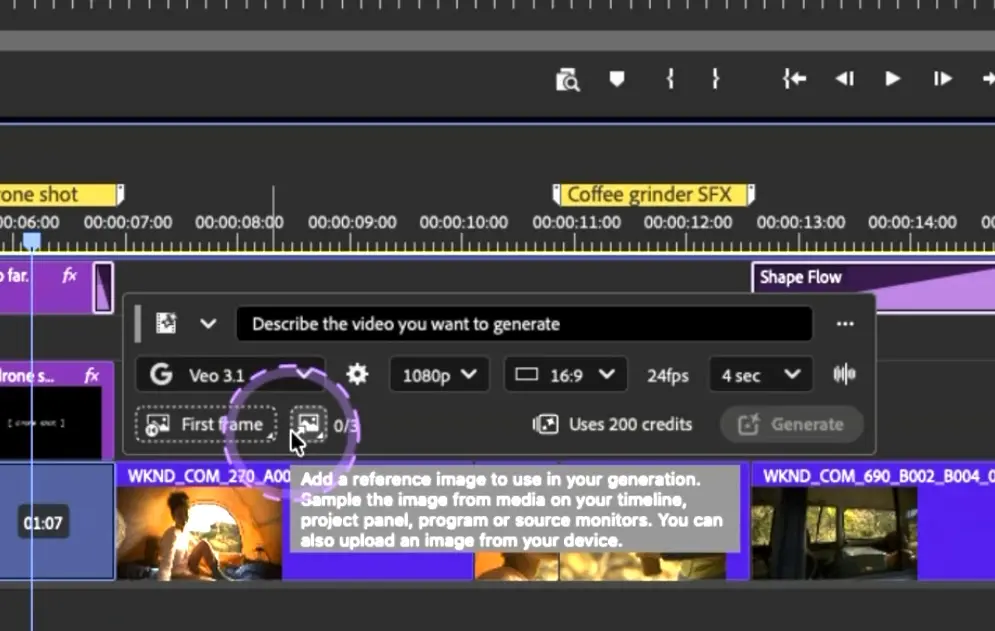
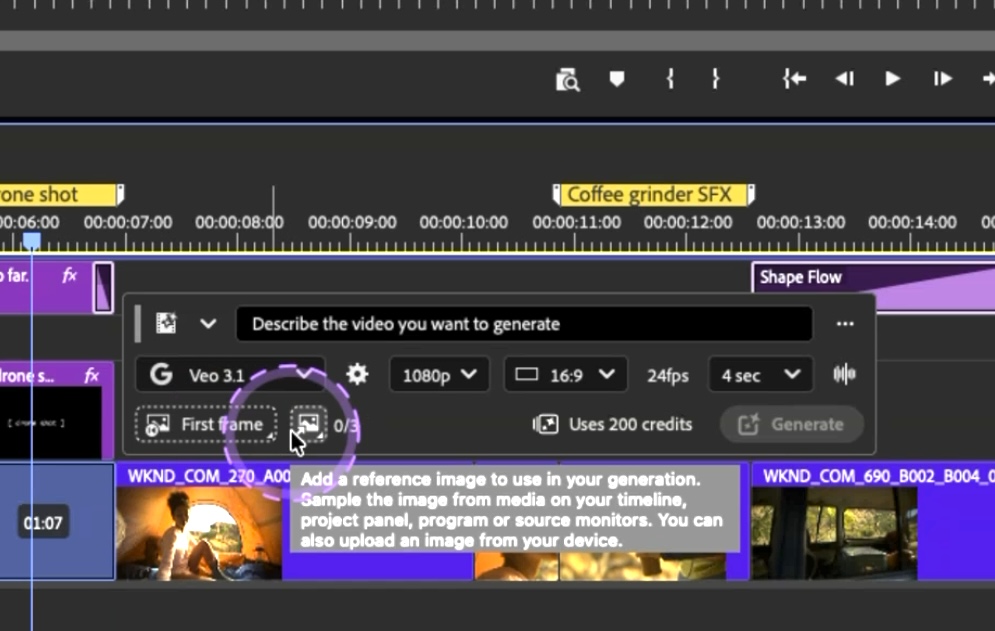
- Text-to-Video and Image-to-Video on the Timeline: Editors can generate placeholder b-roll or concept shots directly on the timeline using text prompts. This eliminates the need to leave the editing suite to source temp footage.
- Advanced Audio Workflows: Building upon the smart audio tagging introduced in previous versions, the IBC 2026 release brings deeper AI-driven audio categorization. Premiere Pro now automatically identifies and tags clips as dialogue, music, sound effects, or ambient noise, instantly exposing custom parameter controls for each specific audio type.
Supporting Context & Metrics
The introduction of these tools is not merely a feature update; it is a calculated response to massive macroeconomic shifts in the media and entertainment sectors. According to recent post-production industry surveys, the average editor spends up to 40% of their billable hours on non-creative tasks—including media management, searching for assets, and troubleshooting technical errors.
| Post-Production Task | Traditional Time Allocation | AI-Assisted Time Allocation | Projected Efficiency Gain |
|---|---|---|---|
| Project Indexing & Org | 2–4 Hours | 3–5 Minutes | ~95% Reduction |
| Expression Troubleshooting | 1–2 Hours | Under 1 Minute | ~98% Reduction |
| Temp B-Roll Sourcing | 1–3 Hours | 2–5 Minutes | ~90% Reduction |
| Audio Tagging & Leveling | 1 Hour | Automated (Real-time) | Instantaneous |
By reducing these time sinks, Adobe positions Creative Cloud as an indispensable suite for high-volume production environments.
However, Adobe is not operating in a vacuum. Competitors like Blackmagic Design’s DaVinci Resolve have aggressively integrated machine learning tools (under their "Neural Engine" banner) for audio isolation, automatic transcription, and smart masking. Similarly, specialized AI startups are threatening to siphon off creative professionals by offering hyper-focused browser-based generation tools. Adobe’s competitive moat relies entirely on its ecosystem integration—keeping the editor inside the Premiere and After Effects timelines rather than forcing them to export and import assets across multiple platforms.
Official Statements & Strategic Vision
In her official announcement, Deepa Subramaniam emphasized that Adobe’s approach to AI is grounded in assisting, rather than replacing, the creative professional.
"Our goal is to eliminate the tedious, repetitive tasks that draw creators away from their art," Subramaniam stated. "With the After Effects AI Assistant and Premiere Pro’s new generative workflows, we are giving editors and motion designers the ability to generate, iterate, and solve complex technical problems directly where they work. This is about amplifying human creativity, not substituting it."
This sentiment is echoed by industry analysts, including Scott Simmons of ProVideo Coalition, who noted that the success of these tools depends on their stability and predictability in high-pressure environments.

The emphasis on "ethical AI" remains a cornerstone of Adobe’s marketing strategy. Unlike open-source models trained on scraped web content, Adobe’s Firefly models are trained on licensed content and public domain images, ensuring that the generative media created on the Premiere timeline is legally safe for commercial distribution—a critical requirement for enterprise clients and major Hollywood studios.
Future Outlook: The Evolution of Post-Production
As the industry moves through 2026 and into 2027, the role of the video editor is undergoing a profound transformation. The boundary between "editor," "sound designer," and "visual effects artist" is blurring.
       [The Traditional Post-Production Pipeline]
Editor ---> Sound Designer ---> VFX Artist ---> Colorist

         [The Modern Unified AI Pipeline]
                ┌──────────────────┐
                │  Unified Editor  │
                │  (AI-Augmented)  │
                └────────┬─────────┘
                         │
        (Handles sound, color, and motion
         using natural language commands)
With natural language processing enabling complex rigging in After Effects and generative media solving continuity issues in Premiere, the technical barriers to entry are falling. The value of a professional editor will increasingly be measured not by their mastery of software shortcuts or programming syntax, but by their taste, structural storytelling ability, and creative direction.
Moreover, the deployment of these AI assistants will likely spark new conversations regarding industry labor standards. As turnaround times shrink, production houses may face pressure to deliver projects faster, potentially offsetting the work-life balance benefits promised by automated efficiency.
Ultimately, Adobe’s IBC 2026 updates demonstrate that generative AI is no longer a futuristic concept on the horizon. It has officially arrived in the timeline, transforming the daily mechanics of post-production and setting a new standard for creative software suites worldwide.