







Executive Overview
With the release of Media Composer 2026.8, Avid Technology has delivered one of its most strategically significant updates in years. For decades, Avid has maintained a dominant, yet tightly controlled, ecosystem in high-end post-production. Historically, collaborative workflows—specifically, the industry-standard "bin locking" mechanism that allows multiple editors to work within the same project simultaneously—were largely locked behind proprietary Avid storage hardware, such as Avid NEXIS or ISIS.
The launch of Media Composer 2026.8 fundamentally reshapes this landscape. By officially extending native Shared Projects and bin-locking support to third-party storage environments—including standard Network Attached Storage (NAS) and Storage Area Network (SAN) systems—Avid is systematically lowering the infrastructure barriers to enterprise-grade collaboration. However, this democratization comes with a calculated licensing caveat: users must transition from the Media Composer Ultimate tier to the Enterprise tier, supported by a $99 upgrade fee.
Beyond storage architecture, the 2026.8 release introduces a suite of sophisticated, efficiency-focused tools designed to modernize the traditional offline edit. Chief among these is PhraseFind Multicam Auto Cut, an AI-assisted tool that automates camera switching based on speaker transcription data. Alongside deep improvements to transcript editing, subclip audio track management, and a radical feature expansion of the free Media Composer | First tier, Avid is signaling a dual-pronged strategy: defending its enterprise market share while aggressively court-shipping the next generation of creative professionals.
Detailed Chronology & Technical Deep-Dive
1. The Open Storage Era: Shared Projects on Third-Party Systems
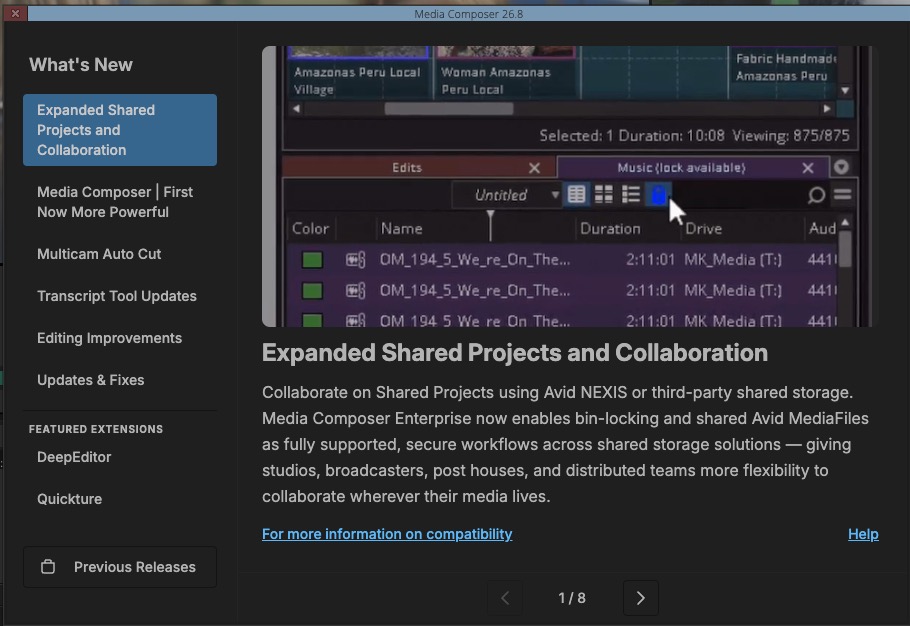
The headline advancement in Media Composer 2026.8 is the native, official support for Shared Projects across non-Avid shared storage infrastructure.
[Traditional Avid Workflow]      --> Requires Proprietary Avid NEXIS Storage for Native Bin Locking
[Media Composer 2026.8 (Ent)]   --> Native Bin Locking over Standard NAS/SAN (SMB, NFS, etc.)
For years, boutique post-production houses and independent editorial teams relied on third-party middleware (such as Indee’s Mimiq) to trick Media Composer into enabling bin locking on non-Avid storage. With 2026.8, Avid brings this capability in-house.
- The Mechanics of Collaborative Bin Locking:
In a shared environment, multiple editors access a centralized project directory. Media Composer 2026.8 manages this concurrency via visual indicators directly inside the bin container:- Green Lock Icon: Indicates the bin is fully editable by the current user.
- Red Lock Icon: Indicates another editor has write-access to the bin. The bin can still be opened in read-only mode, allowing editors to copy clips, sequences, or locators into their own active bins without risk of overwriting their colleague’s work.
-
The Enterprise Licensing Gate:
To access native third-party storage support, editors must run Media Composer Enterprise. Users currently on the Media Composer Ultimate subscription plan can bridge this gap via an official upgrade pathway for a $99 transition fee.For facilities choosing to remain on older software versions or utilize legacy third-party bin-locking workarounds, Avid has confirmed that no immediate action is required; existing pipelines will continue to function without forced migration.
2. PhraseFind Multicam Auto Cut: Algorithmic Rough Cuts
The integration of speech-to-text artificial intelligence into non-linear editors (NLEs) has evolved from a novelty to an operational necessity. In 2026.8, Avid leverages its proprietary PhraseFind AI engine to introduce Multicam Auto Cut, an automated rough-cutting tool optimized for talk shows, podcasts, panel discussions, and multi-camera interviews.
[Ingest Multi-Cam Footage]
       │
       ▼
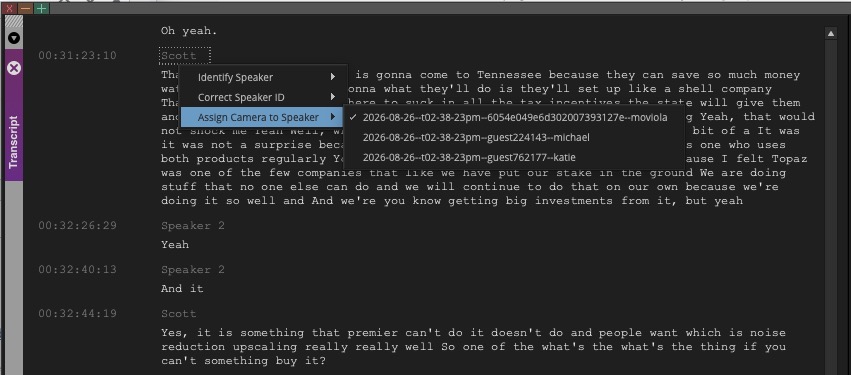
[Run PhraseFind AI Transcription] ──> [Assign Speaker to Specific Camera Angle]
       │
       ▼
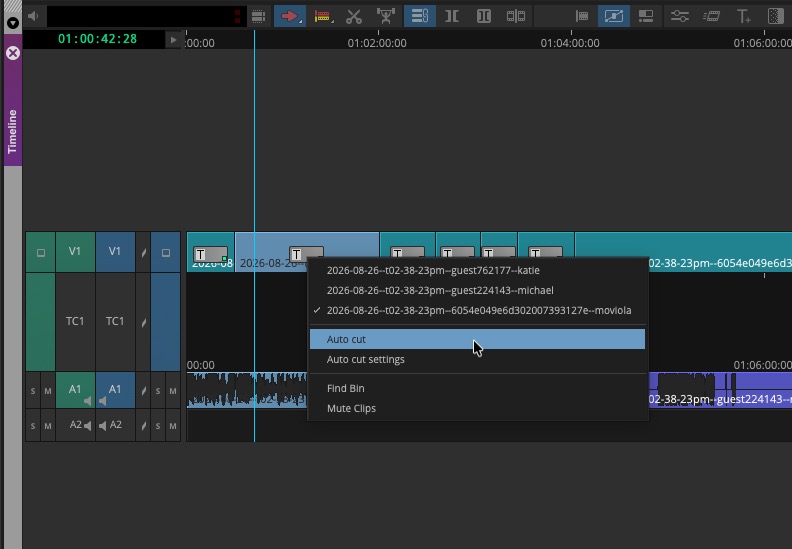
[Right-Click Sequence] ──> [Select "Auto Cut"] ──> [Polished Multi-Cam Timeline]- Step-by-Step Workflow Implementation:
- Ingest & Grouping: Multi-camera clips are synchronized and grouped as usual.
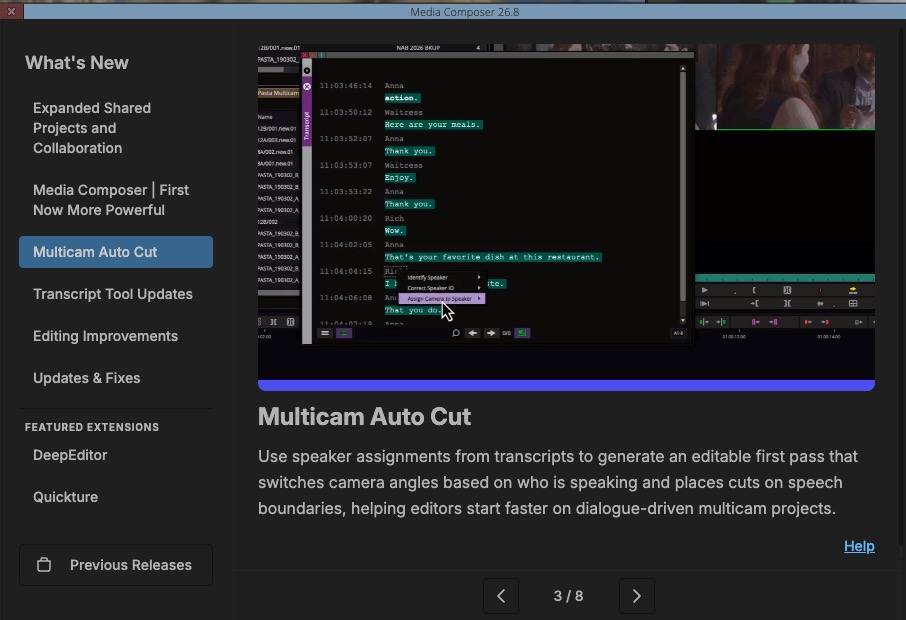
- Transcription & Speaker Assignment: The editor transcribes the group clip using the built-in PhraseFind engine. Inside the Transcript Tool, the editor maps specific detected speakers to corresponding camera angles (e.g., Speaker A to Angle 1, Speaker B to Angle 2).
- The Auto Cut Execution: The group clip is edited into a sequence. By right-clicking the sequence and selecting Auto Cut, Media Composer analyzes the temporal speech patterns of the transcript and automatically executes edits, switching the active camera angle to whoever is speaking.
- Granular Control Parameters:
To prevent erratic, hyperactive cutting, Avid has implemented customizable parameters:- Timing Offset: Adjusts the edit point slightly before or after a speaker begins talking to account for natural conversational pacing.
- Minimum Speech Duration: Prevents the software from cutting to an angle for brief interjections, coughs, or short agreements (e.g., "Yeah" or "Uh-huh").
While not designed to replace the nuanced eye of a human editor—who must cut for reaction shots, emotional subtext, and pacing—this mechanical first pass dramatically reduces the time spent on tedious, line-by-line dialogue switching.
3. Transcript Editing, Versioning, and Formatting
As text-based editing becomes a central pillar of modern workflows, Avid has bolstered the robustness of its Transcript Tool in 2026.8.
- Transcript Versioning:
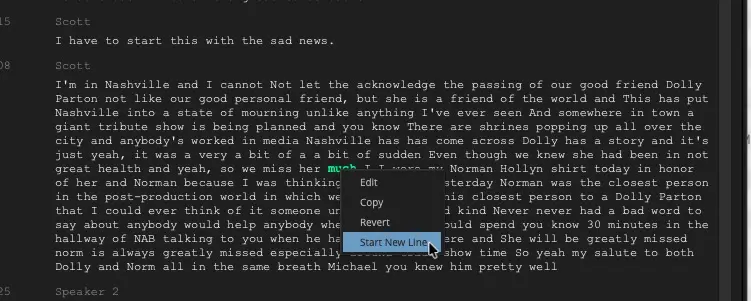
Automated transcripts often require manual correction by assistant editors to fix spelling, punctuation, or speaker identification. Versioning allows editors to freely refine text while retaining a pristine copy of the original, AI-generated transcript. Users can revert individual segments or the entire document back to its baseline state at any point. - Formatting and Segmentation Controls:
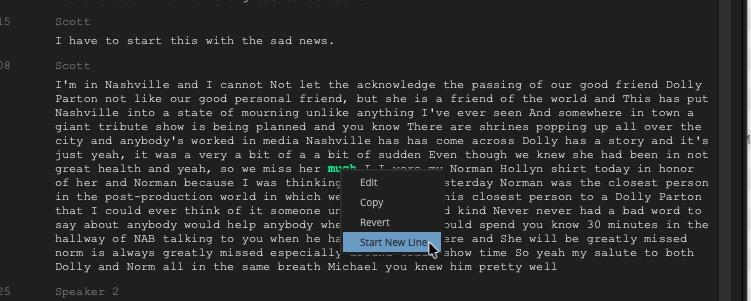
- Split Segment ("Start New Line"): Editors can right-click any point in the transcript to manually split a continuous block of text into a new paragraph.
- Group Speaker Lines: Consecutive sentences spoken by the same individual are automatically consolidated into a single, cohesive paragraph, eliminating fragmented reading blocks.
- New Line After: A highly requested automated formatting feature that automatically inserts paragraph breaks based on a user-defined time interval (set to 30 seconds by default). This prevents the transcript from displaying as an unreadable "wall of text."
4. Micro-Workflow Enhancements
In addition to major feature rollouts, Media Composer 2026.8 addresses several long-standing quality-of-life pain points for professional editors:
- Change Source Track for Subclips:
In complex audio post-production workflows, editors frequently need to swap active audio tracks on subclips or group clips. Previously, this operation was restricted to the audio tracks contained within that specific clip instance. In 2026.8, editors can look back to the parent master clip and select any original audio track directly from the timeline without having to perform a match-back operation. Crucially, any gain adjustments or volume automation previously applied to the clip are preserved. - Enhanced "Choose Columns" Dialog:
Managing metadata is a critical task in high-end VFX and feature workflows. The "Choose Columns" dialog box now features a dedicated search field at the top, full keyboard navigation (usingTabandShift+Tabto toggle between the search bar and the column list, and arrow keys for selection), and vertical window resizing to easily parse hundreds of custom metadata columns. - Titler+ Keyframe Preservation:
Historically, trimming, splitting, or duplicating clips with complex Titler+ animations could result in corrupted or lost keyframe data. The 2026.8 update introduces automated keyframe preservation, ensuring that graphics and title animations scale and shift reliably during timeline re-structures.
Supporting Context & Metrics
The Financial and Operational Mathematics of Collaboration
For mid-sized post-production facilities, the financial implications of Avid’s new third-party storage support are highly significant. To understand the economic landscape, we can analyze the cost of upgrading a typical 10-seat collaborative boutique compared to maintaining legacy workarounds.
| Metric / Cost Component | Legacy Ultimate + Third-Party Tool (e.g., Mimiq) | Media Composer 2026.8 Enterprise Path |
|---|---|---|
| Software Tier | Media Composer Ultimate | Media Composer Enterprise |
| Annual Subscription (Per Seat) | ~$499 / yr | ~$499 / yr (Promo/Transition pricing applies) |
| Upgrade / Migration Fee | N/A | $99 (One-time transition fee per seat) |
| Third-Party Middleware License | ~$199 – $249 (One-time or recurring per seat) | $0 (Native support) |
| IT Support Overhead | High (Managing third-party software updates alongside Avid updates) | Low (Single-vendor native support) |
| Total Year-1 Transition Cost (10 Seats) | $6,980 (Subscription + Mimiq) | $5,980 (Subscription + $99 Upgrade Fee) |
By offering a direct $99 upgrade path from Ultimate to Enterprise, Avid is effectively neutralizing the third-party middleware market. For enterprise IT administrators, consolidating support under a single vendor reduces system integration risks and streamlines software deployment.
The Strategic Re-evaluation of Media Composer | First
Avid’s decision to drastically upgrade its free tier, Media Composer | First, represents a critical tactical pivot. Historically, the free version was heavily restricted:
- Limited to 4 tracks of video and 8 tracks of audio.
- Restricted output resolutions (SD or HD only).
- Proprietary project structures that could not be easily opened in the professional version.
With 2026.8, Avid has stripped away these track limitations and resolution bottlenecks. By providing a free, fully featured environment that utilizes the exact same keyboard shortcuts, advanced trim tools, and bin structures as the industry-standard enterprise version, Avid is positioning itself to counter the rapid adoption of DaVinci Resolve and Adobe Premiere Pro in film schools and universities.
Official Statements, Technical Hurdles & Community Response
Resolving macOS Database Connection Errors
While the initial rollout of Media Composer 2026.8 has been praised for its stability on macOS environments—including successful deployments on macOS Tahoe (26.6.2)—some users have reported a recurring technical hurdle during installation: the dreaded "Failed to connect to server" database offline error.
This issue typically stems from a breakdown in communication between the local PhraseFind/ScriptSync indexing services and the host system’s loopback network interface. For macOS users experiencing this block, a reliable manual workaround has been established within the community:
- Open the macOS Terminal.
- Edit the system hosts file by entering:
sudo nano /etc/hosts - Verify that the local loopback address is correctly mapped:
127.0.0.1 localhost 255.255.255.255 localhost ::1 localhost - If the local mapping is missing or corrupted, append these lines, save the file (
Ctrl+O), and exit (Ctrl+X). - Clear the DNS cache using:
sudo dscacheutil -flushcache; sudo killall -HUP mDNSResponder - Relaunch Media Composer to force the transcription database to re-initialize.
The Community Verdict
The professional editing community has reacted with cautious optimism. While editors welcome the official validation of third-party storage, some online forums have voiced frustration over the "Enterprise tax"—the requirement to pay a $99 fee to unlock a feature that competitors like Adobe Premiere Pro (via Productions) and DaVinci Resolve (via Project Server) offer natively at no additional software licensing cost.
Conversely, long-time Avid veterans argue that the reliability of Avid’s metadata management and bin-locking protocol is unmatched, and that a $99 one-time fee is a small price to pay for native stability on high-performance SAN/NAS storage arrays from vendors like QNAP, Synology, and LumaForge.
Future Outlook
The release of Media Composer 2026.8 marks a clear evolutionary step for Avid under its private equity ownership by STG (Symphony Technology Group). Rather than retreating into an increasingly isolated niche, Avid is actively working to modernize its core offerings.
By opening up its collaborative ecosystem to third-party storage, Avid is acknowledging that modern post-production facilities demand flexibility. The company’s future success will likely depend on its ability to balance this newfound openness with its premium pricing model.
As PhraseFind continues to evolve, we can expect deeper AI integrations, such as automatic b-roll selection, advanced scene-matching algorithms, and tighter cloud-based collaboration tools. With a highly accessible and unrestricted Media Composer | First now acting as a gateway for young talent, Avid is playing the long game—ensuring that the next generation of storytellers is just as fluent in the language of Avid as the generations that came before them.