










Executive Overview
In the rapidly evolving ecosystem of search engine optimization (SEO), visibility has traditionally been anchored in keywords, text strings, and traditional organic rankings. However, consumer behavior has shifted dramatically toward visual discovery. Modern shoppers regularly bypass traditional query boxes, opting instead to snap photos of items they see in the wild, upload screenshots from social media, or use reverse-image queries to hunt down specific products.
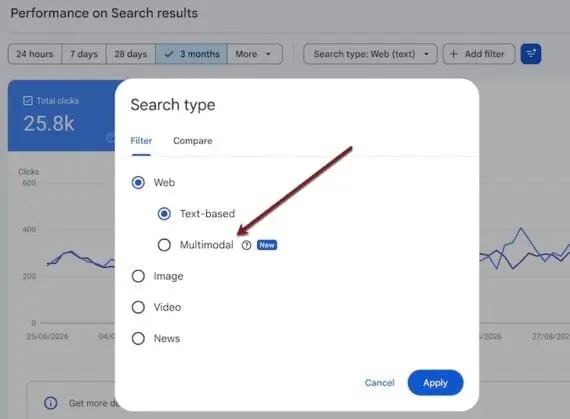
Recognizing this massive paradigm shift, Google has introduced a pivotal update to Google Search Console (GSC): a brand-new "Multimodal" performance filter. This feature provides webmasters, digital marketers, and ecommerce merchants with unprecedented visibility into how users view and click URLs when conducting searches powered by images.
For online retailers, this development marks the transition of visual search from a "black box" channel into a measurable, optimizable traffic driver. Historically, while merchants knew that Google Lens and image-based searches were driving traffic, isolating and quantifying that traffic within analytics dashboards was exceptionally difficult. The new Multimodal filter demystifies this process, bridging the gap between visual discovery and conversion analytics.
This in-depth report explores the mechanics of Google Search Console’s new multimodal feature, details how ecommerce brands can access and interpret these new insights, and provides an authoritative roadmap for optimizing your digital assets to dominate visual search results.
Detailed Chronology: The Evolution Toward Multimodal Discovery
To understand the significance of Google’s latest Search Console update, one must examine the chronological progression of how search engines handle visual data.

From Text-Centric Algorithms to Visual Understanding
In its early days, Google Search was almost entirely text-dependent. Images were indexed primarily through adjacent text, file names, and basic alt attributes. As computer vision technology matured, Google introduced standalone Image Search, allowing users to type a text query and browse a gallery of photographs.
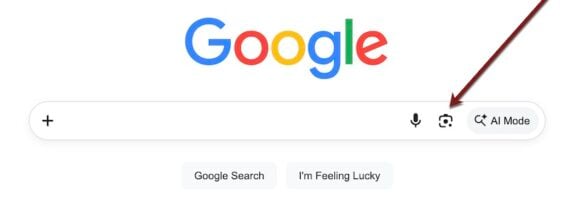
The real turning point arrived with the introduction of visual search tools like Google Lens. By allowing users to point their smartphone cameras at physical objects, landmarks, or apparel, Google shifted from treating images as static illustrations to treating them as queries in their own right. This capability—combining visual inputs with textual context, often referred to as multimodal search—blurs the lines between how humans interact with the physical world and digital databases.
The Blind Spot in Analytics
Despite the explosive growth of visual search platforms (such as Google Lens handling billions of queries per month), digital marketers faced a frustrating data vacuum. While tools like Google Analytics could occasionally attribute traffic originating from general image search referrers, Google Search Console lacked a granular mechanism to isolate the performance of pages discovered purely through visual or multimodal search queries.
Webmasters could see overall web traffic and image-specific queries, but they lacked a dedicated channel to audit how users interacted with pages found via image-upload mechanisms. The introduction of the Multimodal filter inside Search Console directly addresses this long-standing industry blind spot, offering a dedicated lens through which site owners can evaluate their visual search equity.
Accessing and Navigating the Multimodal Filter
For SEO professionals eager to evaluate their site’s visual performance, locating the new metric is straightforward, though hidden deep within the standard GSC hierarchy.
Step-by-Step Navigation
To access the new multimodal performance reports, follow this exact pathway within your Search Console dashboard:
- Log in to your Google Search Console property.
- Navigate to the Performance tab on the left-hand sidebar.
- Click on Search results.
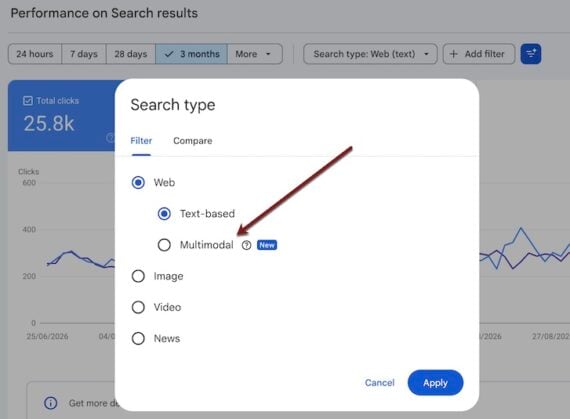
- In the filter bar at the top, locate and click on Search type.
- Switch the selection from the default Web (or Images) to the new Multimodal option.
What the Data Shows (and Doesn’t Show)
Because this filter is specifically designed for image-driven search interactions rather than traditional text queries, the reporting interface differs fundamentally from standard GSC reports:
- No Query List: Unlike standard web search reports, the multimodal filter does not display a list of text queries. Because the search input is an image file rather than typed keywords, query strings are absent.
- No Exact Image Preview: The filter does not output the exact user-uploaded image that triggered the view.
- Core Metrics Tracked: It does, however, provide crucial performance data, including:
- Clicks: The number of times users clicked through to your URL after a multimodal search interaction.
- Impressions: How often your URLs appeared in the results pages of multimodal visual searches.
- Click-Through Rate (CTR): The ratio of clicks to impressions for these specific visual encounters.
- Average Position: Where your URLs ranked on average within the multimodal visual search result grids.
By analyzing these metrics, merchants can finally determine which product pages, category grids, or visual assets are capturing the attention of camera-wielding consumers.
Strategic Implications for Ecommerce Merchants
Ecommerce websites stand to gain the most from this Search Console update. Modern consumer journeys are increasingly non-linear; a shopper might see a sweater on Instagram, take a screenshot, upload it to Google Lens to compare prices, and subsequently land on a merchant’s product page.
Unlocking a Hidden Discovery Channel
Prior to this update, visual search was widely treated as an ancillary bonus channel. With GSC now tracking multimodal performance, ecommerce brands can treat visual search as a primary key performance indicator (KPI).
- Auditing Visual Asset ROI: Brands can evaluate whether investing in high-end product photography actually translates to visibility and clicks within visual search engines.
- Identifying Underperforming Visuals: By cross-referencing high impressions with low click-through rates, merchants can pinpoint product pages where the primary thumbnail fails to compel users to click.
Comprehensive Image Search Optimization Playbook
Capitalizing on Google’s renewed emphasis on multimodal search requires a disciplined optimization strategy. Below is an authoritative roadmap to elevate your rankings, impressions, and conversions from visual search.
1. Implement and Optimize Image Sitemaps
Visual search results rely heavily on Google’s advanced web crawlers discovering and indexing your visual assets efficiently. Submitting a dedicated image sitemap can drastically improve performance within the new multimodal filter.
- How to Submit: Inside Google Search Console, navigate to Indexing > Sitemaps and submit your structured image sitemap URL.
- Platform-Specific Considerations: Popular ecommerce platforms like Shopify natively include images within standard sitemaps. However, installing a specialized image-only sitemap plugin (available via the Shopify App Store or WordPress/WooCommerce repositories) provides greater granular control and indexation tracking.
2. Double Down on Traditional Technical SEO
The foundational rules of search engine optimization remain critical for visual discovery. As a general rule of thumb, images that rank well in traditional text-based image search queries are far more likely to surface in multimodal and visual match interfaces.
- Descriptive File Names: Avoid generic file names like
IMG_1048.jpg. Instead, utilize keyword-rich, descriptive file structures such asergonomic-mesh-office-chair-black.jpg. - Optimized Alt Text: Ensure every product image features rich, descriptive alt text that clearly identifies the object, material, color, and context.
- Captions Matter: Contextual text surrounding an image—including captions and nearby headers—helps Google’s computer vision algorithms verify the authenticity and relevance of the visual asset.
3. Prioritize Exceptional Image Quality and Resolution
Visual searchers are highly visual consumers; poor image quality immediately caps conversion potential. If a user views your product image in a multimodal search results grid but refuses to click, it often signals sub-par resolution, awkward framing, or a lack of clarity.
- Fixing Collection Thumbnails: During testing, digital marketing experts discovered that low-clicked ecommerce photos are frequently low-resolution thumbnails extracted directly from broad category or "Collections" pages.
- The Solution: Replace automated low-res thumbnails with high-resolution, crisp alternative assets. Pro tip: Take a screenshot of a collection thumbnail, run a reverse image search on Google yourself, and evaluate how your asset appears alongside competitor listings.
4. Diversify Angles, Colors, and Contexts
Visual search algorithms do not just recognize general categories; they analyze specific attributes such as angles, lighting, color palettes, and object positioning. While visual search engines can identify an object regardless of perspective, results often favor images that structurally match the user’s input orientation.

- Multi-Angle Strategy: To capture diverse multimodal queries, do not rely on a single front-facing product shot. Diversify your product galleries by including:
- Direct front-facing shots.
- 45-degree and profile angles.
- Extreme close-up shots highlighting fabric texture, stitching, or material quality.
- Lifestyle and contextual photography (e.g., a lamp placed on an actual bedside table rather than isolated against a plain white background).
5. Leverage Generative AI for Visual Ideation
Forward-thinking SEO strategists are increasingly turning to generative artificial intelligence (genAI) to brainstorm visual optimization strategies. Renowned search optimization experts, such as Marie Haynes, recommend utilizing genAI platforms to audit and refine visual strategies.
- Prompting GenAI for Insights: Ask generative tools to analyze what specific visual traits tend to dominate search results for your product category. For instance, prompting an AI platform to evaluate top-performing home decor assets might reveal that products featuring specific warm lighting tones, rustic textures, or complementary background decor consistently outrank starkly lit competitors.
- Data Dashboards: You can even prompt genAI tools to help structure custom reporting dashboards that aggregate your multimodal metrics—tracking top performers (such as specific tile samples, ambient lighting fixtures, or specialty furniture) across impressions, clicks, CTR, and average position.
Future Outlook: The Next Frontier of Search
The introduction of the Multimodal filter in Google Search Console is far more than a minor UI update; it represents a fundamental acknowledgement by search engines that the future of discovery is multi-sensory.
As augmented reality (AR), multimodal large language models (MLLMs), and wearable visual tech continue to advance, the boundary between the physical and digital shopping experience will continue to dissolve. Consumers will no longer search by translating their visual desires into clunky text phrases—they will simply point, capture, and buy.
For ecommerce merchants and SEO professionals, the mandate is clear. Visual assets can no longer be treated as an afterthought or a passive design element. By proactively leveraging image sitemaps, refining technical alt attributes, investing in high-resolution multi-angle photography, and closely monitoring performance via Google Search Console’s new multimodal metrics, brands can secure a distinct competitive advantage in the burgeoning era of visual commerce.