










Executive Overview
In the rapidly evolving landscape of digital advertising, capturing and holding consumer attention remains one of the greatest challenges for modern brands. While traditional YouTube ad formats—such as standalone skippable in-stream ads or bumper ads—excel at driving broad reach and immediate impressions, they often struggle to convey complex narratives or guide audiences through a sophisticated buyer’s journey. Enter Google Ads video sequence campaigns: a powerful yet often overlooked mechanism designed to show multiple video clips in a strict, predetermined chronological order to individual viewers.
Unlike other multi-video YouTube formats that rotate assets dynamically or allow non-linear viewing, video sequence campaigns enforce a strict narrative progression. By orchestrating how a consumer experiences your brand over time, advertisers can move away from repetitive, one-off messaging and instead build cohesive, serialized stories. Whether the objective is to introduce a high-ticket product, differentiate a brand from fierce market competition, or retarget engaged users with timely promotional offers, sequential video storytelling mirrors the effectiveness of traditional television serialization within a highly targeted digital ecosystem.
However, deploying these campaigns requires a precise technical setup and a deep understanding of Google’s structural constraints. Choosing the wrong setup path in the Google Ads admin dashboard will completely hide the ad sequence option. Furthermore, strict bidding parameters, mandatory frequency capping, and granular step-transition logic mean that media buyers must plan their campaigns meticulously.
This comprehensive guide explores the structural anatomy of video ad sequence campaigns, walks you through the step-by-step technical setup, analyzes real-world execution strategies, and provides actionable frameworks for interpreting performance metrics.
Detailed Chronology & Campaign Setup Architecture
Building a successful video ad sequence campaign requires strict adherence to Google Ads’ administrative hierarchy. A single misstep during the initial campaign creation phase will prevent access to the necessary sequence settings.
Step 1: Navigating the Initial Setup
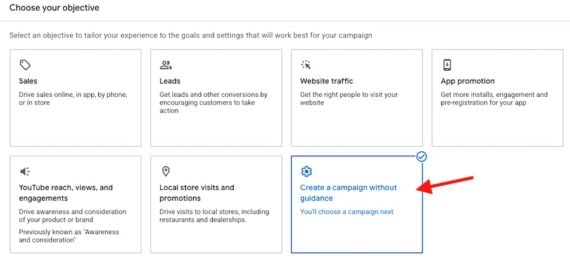
When initiating a new campaign within the Google Ads platform, advertisers must deliberately bypass standard automated recommendations.
- The Golden Rule: Do not select goals like "YouTube reach, views, and engagements," as these presets will restrict your creative options and omit the sequence builder entirely.
- The Correct Path: Begin by selecting “Create a campaign without guidance.”
- Campaign Type: Choose “Video” as the core campaign type.
- Campaign Subtype: Select the “Ad sequence” subtype. Once this option is locked in, the interface will dynamically adjust to accommodate multi-step video architecture.
Step 2: Configuring Campaign-Level Parameters
Once the ad sequence subtype is established, advertisers must configure foundational campaign settings, which come with distinct restrictions:

- Bidding Strategy: Video sequence campaigns are restricted exclusively to Target CPM (tCPM) bidding. Advertisers cannot use maximized conversions or cost-per-view (CPV) bidding models for the campaign as a whole, meaning budget management must rely entirely on impression-based cost optimization.
- Frequency Capping: To prevent ad fatigue and ensure your narrative unfolds naturally without alienating the viewer, frequency capping is mandatory. Advertisers must define how often an individual user can see the complete sequence. The platform restricts these intervals to either once every 7 days or once every 30 days. Selecting the appropriate window depends entirely on the length of your sales cycle and the complexity of your product offering.
Step 3: Structuring the Sequence (Ad Groups & Step Transitions)
Within a video sequence campaign, each step in the sequence corresponds to an independent ad group. If your narrative design calls for a four-part video story, your campaign structure will contain four distinct ad groups.
Every ad group houses:
- The specific video creative asset.
- The designated call-to-action (CTA) and companion headline.
- The precise trigger rules governing when the step is allowed to display.
For the very first video in the sequence, no transition rules are necessary—it serves as the entry point for the user. However, videos two and beyond require explicitly defined step transitions. Google provides three primary behavioral triggers:
- Impression: The subsequent video triggers as long as the user was served an impression of the preceding video (regardless of whether they watched or skipped it).
- View: The subsequent video triggers only if the user actively watched the preceding video past a qualifying threshold (or to completion).
- Skip: The subsequent video triggers specifically if the user chose to skip the preceding video—a brilliant tactic for retargeting indifferent viewers with a different angle or value proposition.
By mixing and matching these triggers, media buyers can construct branching narrative paths that adapt dynamically to user behavior.
Leveraging Google Asset Studio for Creative Production
Producing multiple distinct video assets for a sequence can quickly inflate production budgets and timelines. Fortunately, Google’s built-in Asset Studio provides native editing capabilities that allow marketers to maximize their existing video libraries without requiring a complete overhaul from a production agency.
The Power of the "Trim Videos" Tool
One of the most valuable features within Asset Studio is the "Trim videos" functionality. This tool allows advertisers to take a single, comprehensive long-form asset—such as a 2-minute product demonstration or brand overview—and slice it into modular, bite-sized components tailored for sequential delivery.
Asset Studio supports a wide variety of video formats and durations, making it seamless to extract specific narrative beats. For example, a brand might take a master product demo and segment it as follows:
- Clip A (0:00 – 0:15): The core problem statement and hook.
- Clip B (0:15 – 0:30): The primary product feature and utility.
- Clip C (0:30 – 0:45): Social proof and consumer benefits.
- Clip D (0:45 – 1:00): The final offer and urgent call-to-action.
A Word of Caution on AI-Generated Video Assets
While Google’s Asset Studio also features capabilities for generating AI-driven video content, veteran media buyers advise caution. While AI tools can assist in rapid prototyping, relying exclusively on artificially generated video assets across a multi-step sequence can dilute brand authenticity. Consumers value genuine human connection, particularly when being guided through a complex purchasing decision. If AI assets are utilized, they should be deployed sparingly and tested rigorously against human-shot creative.
Real-World Execution: Case Studies in Sequential Storytelling
To fully understand the practical application of video sequence campaigns, let us examine how a hypothetical direct-to-consumer brand can structure their messaging using real-world frameworks.
Example 1: The "Introduce and Reinforce" Framework (Yarbo Robot Lawn Mowers)
Imagine the marketing team at Yarbo, a manufacturer of advanced autonomous robot lawn mowers, wants to deploy an "Introduce and Reinforce" sequence. High-ticket hardware sales require more than a single 6-second bumper ad; consumers need to understand the value proposition before committing to a purchase.
- Asset Sourcing: The team takes their primary long-form product demonstration video and uses Google Asset Studio to trim it into two distinct narrative segments.
- Step 1 (Introduction):
- Video: The first 30 seconds of the demo focusing on core time-saving capabilities.
- Headline: "Save Time on Weekend Chores."
- Call-to-Action (CTA): "Learn more," linking directly to an educational blog post or the brand’s homepage.
- Objective: Build foundational brand awareness and educate cold audiences on the existence of automated yard maintenance.
- Step 2 (Reinforcement & Conversion):
- Video: The subsequent 30 seconds focusing on durability, automated docking, and seasonal versatility.
- Headline: "Labor Day Hardware Sale — Limited Time."
- Call-to-Action (CTA): "Buy now," linking directly to the product checkout page.
- Transition Rule: Triggered based on an impression or view of Step 1.
- Objective: Capitalize on the established familiarity from Step 1 by introducing a time-sensitive promotional incentive that drives immediate conversion.
Example 2: The "Engage and Differentiate" Framework
Alternatively, the Yarbo marketing team could deploy a four-part "Engage and Differentiate" sequence utilizing four distinct 15-second clips derived from the same master asset. Each clip highlights a unique unique selling proposition (USP):
- Clip 1: Mowing precision and terrain handling.
- Clip 2: Snow-blowing attachment capabilities for winter use.
- Clip 3: Smart-app integration and scheduling controls.
- Clip 4: Customer testimonials and warranty protection.
By spacing these clips out via a 7-day frequency cap, Yarbo ensures that potential buyers are continually reminded of different product facets over the course of a month, drastically increasing brand recall compared to a repetitive single-video blast.
Supporting Context, Metrics, & Performance Interpretation
Evaluating the success of a video ad sequence campaign requires a fundamental shift in mindset. Because these campaigns prioritize brand narrative, demand generation, and psychological priming over immediate last-click conversions, traditional ROAS (Return on Ad Spend) calculations tell an incomplete story.
Core Metrics for Sequential Success
When analyzing campaign data inside the Google Ads dashboard, media buyers should focus heavily on engagement and progression metrics:

- Sequence Completion Rate: The percentage of users who successfully progressed through every single step of your ad sequence. A high completion rate indicates that your narrative pacing is compelling and that drop-off points are minimized.
- Step-by-Step Drop-Off Analysis: By reviewing conversion metrics between Ad Group 1 and Ad Group 2, advertisers can identify precisely where audience interest wanes. If 90% of users see Step 1, but only 15% transition to Step 2, the creative hook of the first video or the strictness of the transition rule requires immediate optimization.
- View-Through Rate (VTR) per Step: Evaluating how long users stay engaged with each individual modular clip.
Bridging Engagement with Conversion Tracking
While engagement remains the primary north star for ad sequences, performance marketers must still connect the narrative arc to bottom-line revenue. Advertisers should actively track:
- Post-Sequence Clicks: Users who engaged with the sequence and ultimately clicked through to landing pages.
- View-Through Conversions (VTCs): Users who viewed the sequence without clicking, but later returned to the site organically to complete a purchase.
- Assisted Conversions: How exposure to the multi-step sequence improved the performance of simultaneous Search or Retargeting campaigns.
The Diagnostic Benchmark: As a general rule of thumb, if fewer than 10% of your audience watches 100% of a given sequence video, the creative asset requires structural revision. Pacing, audio cues, and value delivery must be front-loaded to retain viewer attention.
Future Outlook & Strategic Recommendations
As digital privacy regulations tighten, cookie deprecation accelerates, and ad fatigue reaches an all-time high, the era of lazy, repetitive interruptive advertising is drawing to a close. Consumers increasingly expect brands to communicate with them intelligently, contextually, and respectfully over time.
Google Ads video sequence campaigns represent a vital tool for modern digital marketers seeking to cut through the noise. By combining the massive reach of YouTube with the narrative power of serialized storytelling, brands can transform cold prospects into deeply engaged brand advocates.
Key Takeaways for Media Buyers:
- Design with a Narrative Arc: Never treat your sequence videos as isolated silos. Map out the psychological journey from problem identification to brand solution before touching the Google Ads dashboard.
- Leverage Native Tools Wisely: Utilize Google Asset Studio’s trimming capabilities to stretch production budgets, but maintain creative authenticity to keep audiences hooked.
- Monitor the Funnel Closely: Regularly audit your step-transition drop-offs and adjust your frequency caps to balance maximum exposure with minimum user annoyance.
When executed with precision, creative discipline, and rigorous metric analysis, video ad sequences do more than just generate impressions—they build lasting brand preference that drives sustainable, long-term growth.